

I have been playing with Iris for days now and I find the app pretty entertaining. Iris is like Siri, but for Android devices. The name is SIRI in reverse, so you know that the app is really trying to be like Siri and the developers are obviously flaunting this fact.
There are many apps that imitate Siri and almost all of them are quite frustrating. They are buggy, clunky, and lack the features that made Siri a hit on the iPhone 4S. Iris is so far the best Siri-wannabe I have ever used. It is still on Alpha stage so it’s bound to get better over time.
Iris is from the developer Dexetra, but the app is made possible in collaboration with ChaCha, Kiip, World Weather Online, Yahoo Finance, YouTube, Bing, DuckDuckGo and Twitter. To be able to us the app, you have to have internet connection either through Wi-Fi or 3G.
Iris has a lot of features and does a lot of stuff that Siri is able to do. Of course the main feature of Iris is voice search, which is done by simply asking Iris your questions. It’s quite effective with search, and almost all the time, it turns in relevant answers. For the list of features, here are the things Iris can do:
- Call someone (can you please call ____)
- Text someone (send a text to _____)
- Search nearby establishments (find me a nearby coffee shop)
- Play music (play the song ______)
- Ask movie reviews (should I watch the movie ________)
- Watch videos (show me a video of ________)
- Find news (what is the news about ________)
Iris does these stuff quite effectively, although with respect to finding establishments, it’s obviously not meant for establishments in the Philippines. The voice recognition on Iris is quite impressive especially if you are talking in a quiet environment. In terms of percentage, I’d say it gets what you’re saying 90% of the time. You have to have an American accent though, otherwise the app will not be able to effectively do the tasks. The app proved to be helpful when you’re inside a car driving or whenever you are otherwise preoccupied and just need someone to do the searching or typing or dialing for you.
The UI for Iris is well designed. It looks good and quite honestly, it appears to be designed for Ice Cream Sandwich as the blue theme is obviously ICS inspired. You use Iris the way Siri is used. There’s a button at the bottom which you press when you want to interact with Iris. The app has a few settings adjustments, one for enabling question playback, one for enabling answer playback and one for network timeout.
Here are screenshots of the app.


The app is not a resource hog and works even on lower end Android phones. I have seen it used on an LG Optimus One and it’s just as fast and as effective. Just like Siri, Iris is also quite funny at times. Look at these answers I got to some of the questions I asked Iris.
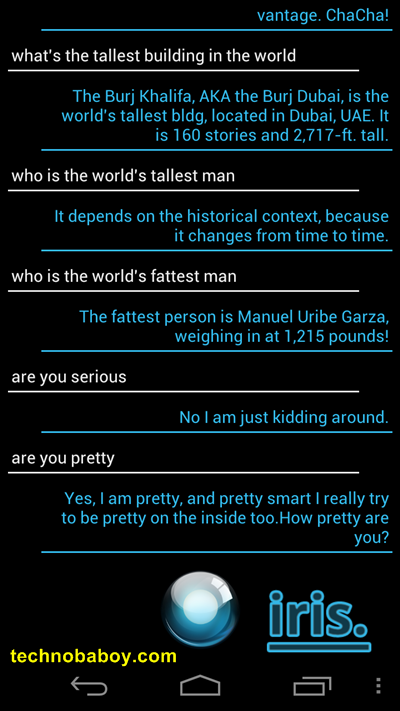
Iris is already a good app at this point and what’s impressive is it’s only on Alpha build. I can’t help but be excited for the developers as it appears that this is the first real answer to Apple’s Siri. Of course it’s not a “true” assistant the way Siri is but it has the potential to be.
If you’re on Android, download Iris now from the Android Market. You’ll enjoy it.


5 Comments
Siri was better when it first came out for iPhone in February of 2010 and was also headed for Android until Apple bought it in April. Just because iDiots believe CrApple has the Mitas Touch, they assume Siri is somehow better now than it was originally now that CrApple’s name is on it. Even the Woz will tell you, it’s NOT!
VLingo goes back even further in development (than Siri) and it is the only personal assistant that incorporates Google Maps in true Hands Free Voice Turn by Turn with “In Car” App. Siri pails by comparison just on this one feature alone. Where as soon as I dock my phone in my car it’s a totally touchless interface and I don’t have to split my attention between the road and my phone screen to read the map directions as you do on an iPhone.
Apple will never have Street View either or even a close equivalent as Google Maps/Voice Turn by Turn/Street View are the highest quality developed map apps on the planet. It’ll take years for anyone else to catch up…. if ever!
The inner workings of Google’s Majel has been in development longer than even Siri and reports are that it’s an honest integrated attempt to marry a truly native Real Time OS intelligence into the Android itself from scratch. NOT simply an addon service to sell a phone that delivers little else and Siri is it’s greatest feature… haha!
But even voice actions goes beyond Siri in on device capabilities and features. Google’s Majel will no doubt leave Siri sleeping in the park, delivering answers as if it’s still got a newspaper spread out over it’s head!!! ;-P
I have this app to but I like Speak to it assistant. You customize and Avatar and it answered most everything that was above for Iris to answer.And my Avatar knows your name and you can name him/her. It’s really cute!
that looks cool! thanks for the tip bro! :)
As per your suggestion, I installed Iris on my phone this morning. I must have wasted a good 30 minutes just fooling around with it. On of the most entertaining features are the funny responses to certain phrases. Are there any similar apps that let you add custom commands/responses?
try Jeannie, its free in the market