
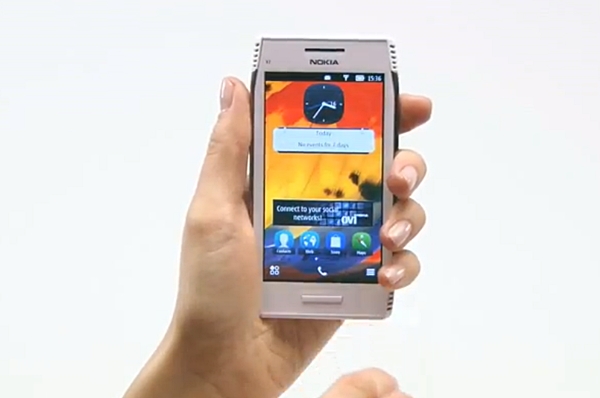
Nokia just announced the availability of Symbian Belle for a number of Nokia phones. Symbian Belle is the newest version of Symbian OS and from my experience using the Nokia 700, it’s far superior to previous versions. Nokia encourages owners of compatible phones to update, saying that once that have installed Symbian Belle, they’ll still have the same phone, but “it will feel like new, with improved performance”.
The availability of the Symbian Belle update starts today. Nokia announced that the update will be available for the following compatible phones:
- Nokia N8
- Nokia E7
- Nokia E6
- Nokia X7
- Nokia C6-01
- Nokia C7
- Nokia Oro
- Nokia 500 (available within the next few weeks)
Nokia Belle has improved personalization options like the six home screens which can be individually customized, live widgets, screen shortcuts and a drop down menu. The Nokia Belle interface also offers imaging applications including HD video recording at 30 frames per second and also an improved browser.
The Symbian Belle update is already available to users in the Philippines and in several other countries including India, Russia, United Arab Emirates, Turkey, Poland, UK, Germany, Italy, Vietnam and Indonesia. If you want to check the availability of the Symbian Belle update in your country including its availability for your phone model’s code, go here.
How to Update to Symbian Belle
- Go to nokia.com/nokiasuite to download and install the Nokia Suite. Make sure you have the latest version of Nokia Suite (3.3 or later)
- Connect your phone to the computer with a USB cable.
- Select the Software Updates icon on Nokia Suite
- Follow the instructions on the screen (Nokia Suite will backup your data)
- Enter the PIN for your phone when prompted
Here’s a video tutorial from Nokia that might help you update your phone to Symbian Belle.
httpvh://www.youtube.com/watch?v=FMyndeAkcOw



29 Comments
Right now it appears like Movable Type is the top blogging platform out there right
now. (from what I’ve read) Is that what you are using on your blog?
b8 po nd q ma update N8 ko?
gumamit nmn ako ng nokia.com/nokiasuite nag hihinge siya ng user:name?
pls do rply
kahit anu ilagay ko user:name yaw parin gumana b8 ganun?
pls do rply
dear admin:
ang nokia symbian ba ngaun, ung mga latest version ng symbian OS nakakaplay na ba sila ng mga movies in any kind of extension?
kapg android kc di na kailangan magconvert ng movies to 3gp.. ganun din sana sa Symbian dina kailangan magconvert pa.
Un sana ung dinagdag nila na isang Feature ng Symbian mas maganda pa..
dvd copy pwed napo directly to usb
x7 updates
paano po mag update ng N8… sa nokia suite SW UPDATE nkalagay lang ay BELLE DEMO???
instructios nasa taas po
111.130.0622 software version hai
flv file play hoti hai belle software per.mere set nokia e6 hai
yesterday i tried to update my nokia e7 to symbian belle bt i cudnt make it i noticed that when it showed that download will be completed in less than a minutes then it just hanged and never finish…………….plzzzzz help………i’m in a big trouble…….
NO update for c7
hellow i want to know how i update my nokia x7 rm-707 to belle,,i have serched an tryed lot of times to up date my my phone to belle but i cant find a up date i you can plzz tell me how to update
@1d5ef5c7e22daf058ad51953220138a4:disqus There’s an update.. update it using your computer via nokia suite.. i have a nokia c7-00 i updated mine..
what the version of your nokia suite? mine 3.3.89
why my nokia suite is asking for a username whenever i click on the install??i cant even create a username..why?? pls help me 09359014601..tnx mmumuch
C7-00
doesn’t have update on symbian belle why?
Hi there, i would like to know how to change fonts of my nokia c6-01 updated to symbian belle. Please.. Please let me know how.. thanks.
just finished updating my N8. thanks. the instructions are easy to follow. i’m not so sure i’m loving the new look. im planning to give this to my mom, she would prefer the big icons though. i see ginawa nilang almost N9-like ang main menu. yikes, need to reinstall some of the disappeared apps.
my mistake, wala naman palang na-erase. pero the annoying flashing of the envelop is still there kahit empty na inbox ko.
i can get my n8 updated. the USB cable does’t seems to work, finding drivers to no avail but the bluetooth does. what can i do?
can’t i upgrade with bluetooth?
hi, does this work if I connect my nokia e7 to a Mac?
it should work as long as you have the Nokia Suite
when i click the sw icon there is no update to symbian belle on the list and i have the nokia suite version 3.3.84. what is the problem?
is your phone among those in the list?
I have the same problem to my C7.
Hi. I can’t update too my c7. I’m using Symbian Anna. How can I upgrade to Belle?
SAME PROBLEM Too