Google is rolling out its AI‑powered Try On feature in the Philippines, giving online shoppers a way to see how clothes look on them before hitting checkout.
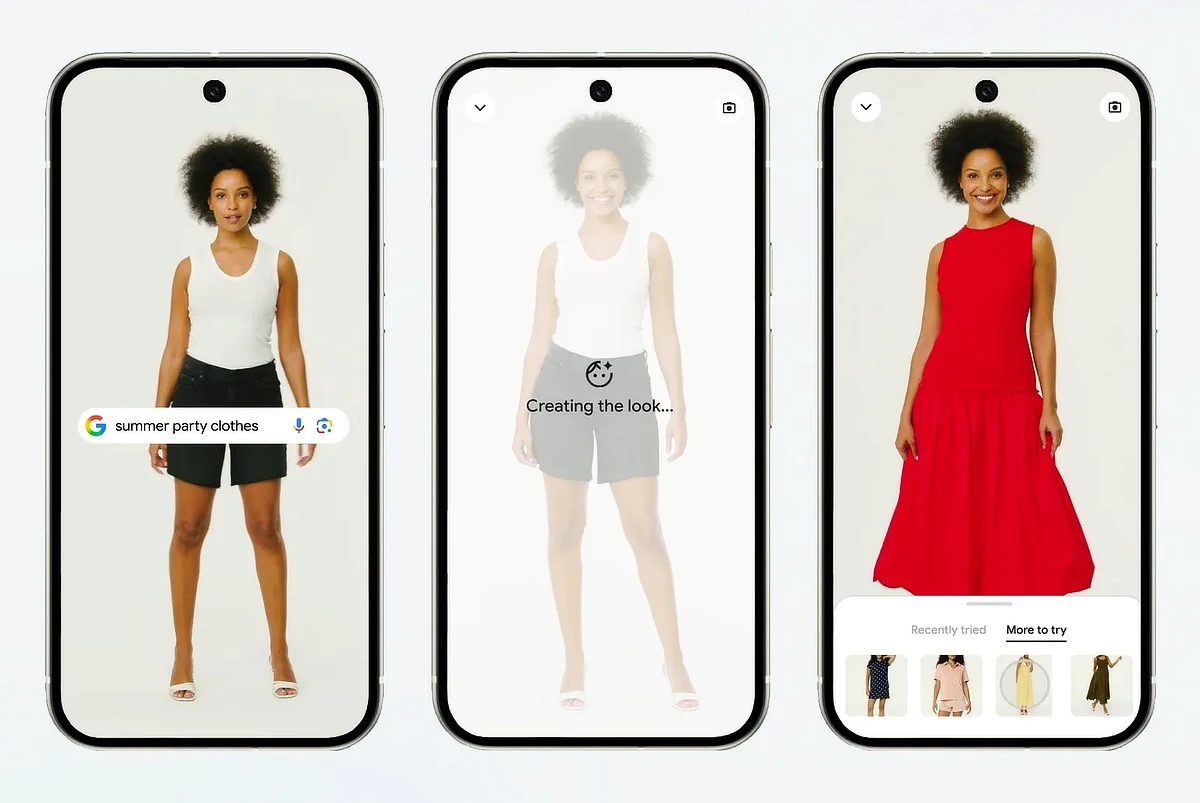
The tool works by letting users upload a full‑length photo, then virtually try on tops, bottoms, dresses, and footwear. It uses Google’s custom image generation model to show realistic previews of how fabrics fit and drape across different body types.
Try On is integrated into Google Search, Shopping, and Images. Shoppers can tap the “try it on” icon on product listings, upload a photo, and experiment with styles and colors. Looks can be saved, shared with friends, or purchased directly from retailers.
How to use Try On
Shoppers can tap the “try it on” icon on product listings in Google Search, Shopping, or Images.
After uploading a full‑length photo, they can browse styles, switch colors, and see how items look on their body type. Favorite looks can be saved, shared with friends, or purchased directly from retailers.
Also Read: Google introduces new AI subscriptions with Gemini Spark
The feature aims to bring the fitting room experience online, making the virtual try‑on feel closer to real life.